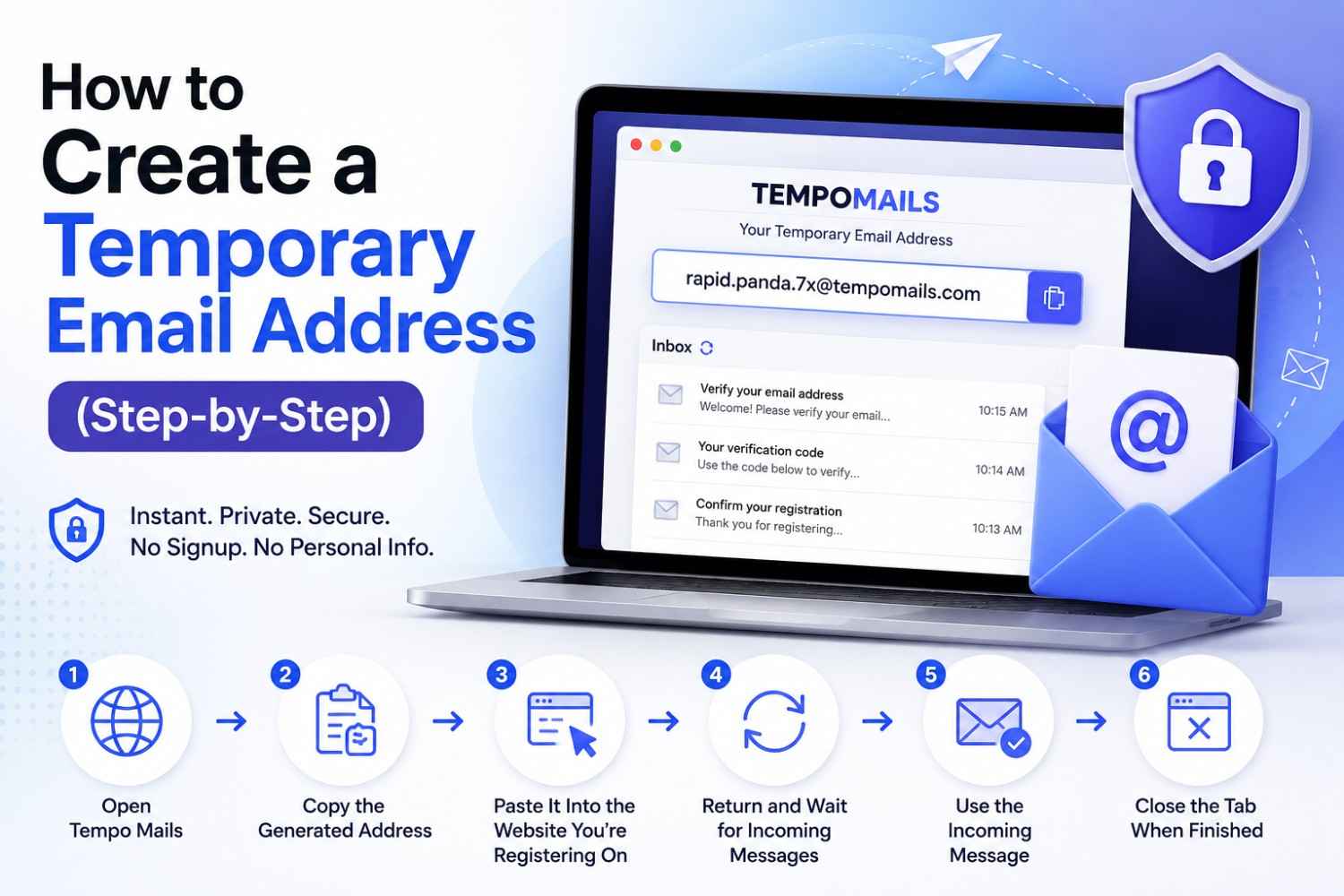
How to Create a Temporary Email Address (Step-by-Step)
By Sarah Whitfield, temporary email and online privacy specialist at Tempo Mails.
Quick Answer: Learning how to create a temporary email takes under ten seconds with a temporary email generator like Tempo Mails. Open the site, receive a generated address instantly, copy it into any signup form, and read incoming messages in real time. No account, no password, and no personal data required — the inbox deletes itself automatically when the session ends.
Key Takeaways
Instant email creation through Tempo Mails requires zero steps from the user beyond opening the page.
The generated address works on any website that accepts a standard email format.
Incoming messages, verification codes, and confirmation links arrive within seconds.
The temporary inbox generator deletes everything automatically; no manual cleanup is needed.
Why People Want to Create Temp Mail
Before the steps, understanding the motivation matters. Most online services ask for email addresses for verification purposes, not because they need to contact you, but they want to keep your address for future marketing.
A disposable email address helps to keep things separate: verification and commitment. The website gets what it needs to process the signup. The user gets what they came for. Neither party accumulates an ongoing obligation from that single interaction. Tempo Mails exists for exactly this purpose.
Many users who submit their real email address for a one-time download or free trial continue receiving marketing messages from that source for months afterward, since a single signup is often enough for a business to add the address to a recurring mailing list.
How to Create a Temporary Email — Step by Step
How to create a temporary email refers to the process of generating a working, session-based disposable address through an instant email creation tool that requires no registration or personal information.
Step 1: Open Tempo Mails
Navigate to the temporary email generator at tempomails.com. The page loads, and a unique email address appears automatically in the inbox interface. No form to complete. No button to press. The temporary email setup is already done.
Step 2: Copy the Generated Address
The address displayed is your active inbox for this session. Use the copy button on the screen or select and copy the text from the screen.
Step 3: Paste It Into the Website You Are Registering On
Go to the website or service that requested your email. Paste the Tempo Mails address into the email field. Complete the rest of the registration as normal.
Step 4: Return to Tempo Mails and Wait
Switch back to the Tempo Mails tab. The temporary inbox generator refreshes automatically. Incoming messages appear within five to fifteen seconds of being sent. You do not need to reload the page.
For a closer look at how the auto-refresh and auto-delete cycle works behind the scenes, see this guide on accessing a temporary mailbox instantly.
Step 5: Use the Incoming Message
Click verification links, copy confirmation codes, or read any content delivered to the inbox. All functions operate as they do in a normal email account.
Step 6: Close the Tab When Finished
When the task is complete, close the Tempo Mails tab. The address deactivates immediately. The service permanently deletes all messages. It stores nothing from the session, and nobody can recover it.
What Happens During a Temporary Email Setup
Temporary email setup is the background process through which a disposable address is generated, assigned to an active session, and connected to a receiving infrastructure that accepts and displays incoming messages in real time.
When Tempo Mails, a disposable email service, generates an address, it creates a unique inbox tied to that specific session. Any email sent to that address routes to the session inbox in real time. The infrastructure handles HTML formatting, plain text, attachments, and embedded verification links.
The service generates a new address for each session. It remains available only during that session. The address has no history before you use it, and the service leaves no history after it expires.
When to Use Instant Email Creation
Not every online situation calls for a disposable address. The tool becomes more useful if there is an understanding of the right contexts.
Use it when: Signing up for a free trial with no intention of subscribing.
Accessing gated content behind a registration wall.
Registering on forums or community platforms when you do not want ongoing notifications.
Testing an app or service before committing to a real account.
Carrying out a one-off enquiry on a web marketplace that does not require your true contact information.
This also covers everyday retail sign-ups — see this walkthrough on using a temporary email for Amazon OTP verification as one example, or this guide on creating a disposable email for Twitter if the goal is a social media signup.
Do not use it when: Setting up accounts that need ongoing recovery access to banking services, health services, or platforms that require password resets to your email.
Situations where ongoing communication with the service genuinely matters.
The distinction is straightforward. If you need the address once, use Tempo Mails. If you need it permanently, use your real inbox.
Create Temp Mail for Developer and Testing Use
Creating temp mail in a development context refers to generating disposable addresses for testing registration flows, email delivery systems, and transactional email templates without creating real user records in production environments.
Developers use Tempo Mails' temporary inbox generator to verify that welcome emails, password reset flows, and verification systems function correctly. Each test uses a fresh address. You do not need to clean up test accounts because the inbox deletes itself automatically.
Multiple addresses can be generated for concurrent test scenarios, and many development teams rely on disposable email addresses for this kind of regular testing because they can be discarded easily without cluttering the production database. This makes Tempo Mails a practical quality assurance tool as well as a personal privacy tool.
What the Temporary Inbox Generator Does Not Store
A service's level of privacy is not only determined by what it removes but also by what it keeps.
No message content, address string, session time, or identifying user information remains after a Tempo Mails session ends.
This means that even if asked, Tempo Mails cannot produce records of what was received, when it was received, or who used the inbox. The deletion is complete rather than archival.
About Tempo Mails
Tempo Mails provides instant temporary email addresses with no registration required. Open the temp mail tool, create temp mail in seconds, receive messages in real time, and protect your privacy with automatic deletion.
Ready to try it yourself? Generate a temporary email now and see how fast the process really is.
FAQs
How long does the setup process actually take?
Under ten seconds. The address appears the moment Tempo Mails loads. No additional steps are required before the inbox is active and ready to receive messages.
Does the generated address look like a real email?
Yes. Tempo Mails addresses use the standard email format with an at symbol and a recognised domain. Websites that check for valid email formatting accept them without issue.
Can the same address be regenerated after the session ends?
No. Each Tempo Mails address is unique to the session that created it. Once deleted, the address is gone permanently. Generate a new one for each separate task.
Is there a limit to how many messages the temporary inbox can receive?
No fixed message limit applies during an active session. The inbox receives all incoming messages sent to the active address until the session expires.
What if a message has not arrived after a few minutes?
Check that the address was copied correctly with no extra spaces. Some sending servers apply a short delay. If the message does not arrive within five minutes, regenerate an address and retry the registration.
Does Tempo Mails work on mobile browsers?
Yes. The temporary inbox generator is fully functional on mobile browsers without requiring an app download or any configuration changes.
Can two separate Tempo Mails sessions share the same inbox?
No. Each session generates a unique address with its own isolated inbox. Sessions do not interact with or have visibility into each other.
Is it possible to extend a Tempo Mails session before it expires?
Session duration is fixed. For tasks requiring more time, keep the tab open and active. Closing or allowing the tab to go inactive triggers automatic deletion.