
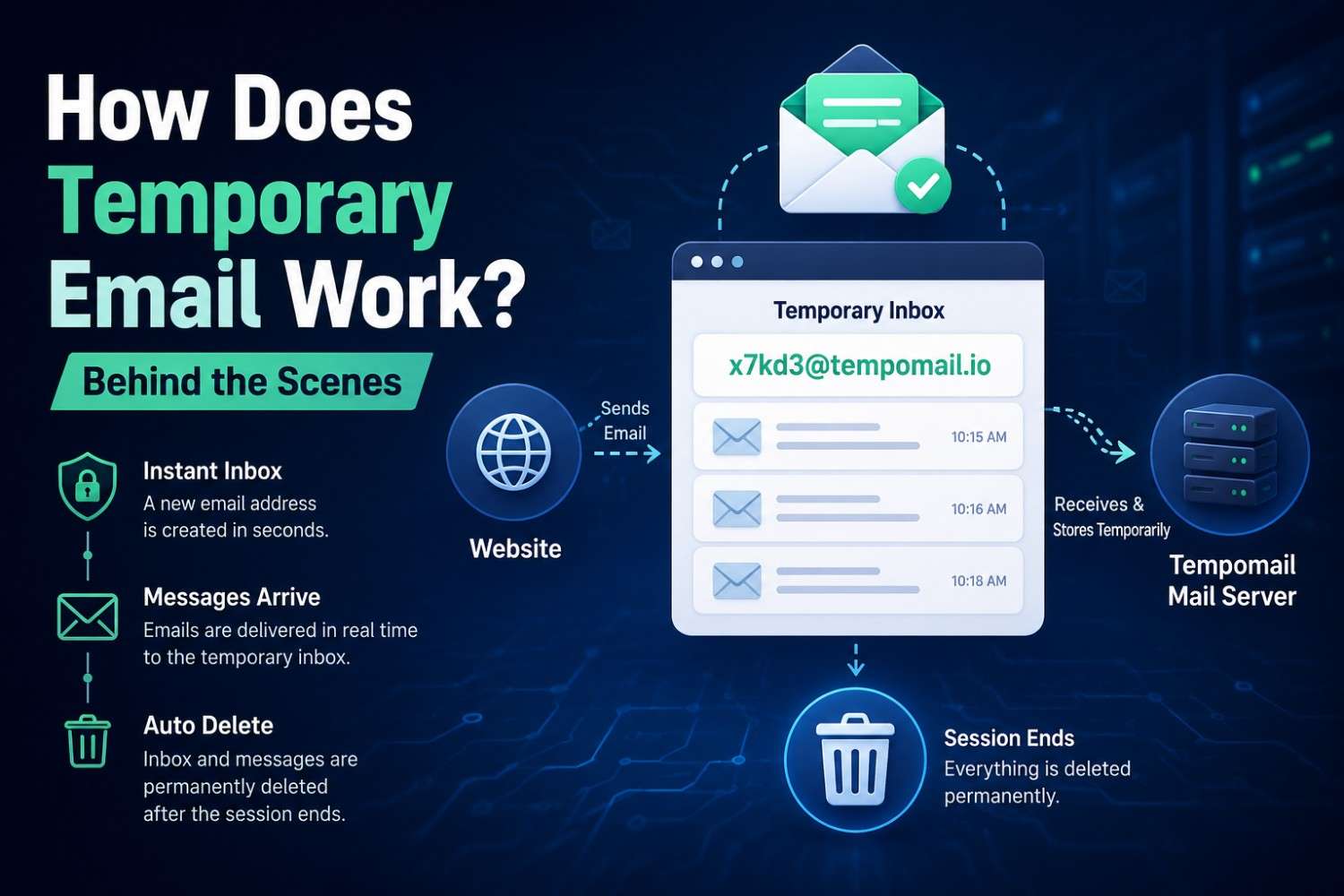
How Does Temporary Email Work? Behind the Scenes
How Does Temporary Email Work? Behind the Scenes
Quick Answer: How does temporary email work? A temporary email service provides a new email address that is connected to a mail server with a very short-lived inbox. Any message sent to that address is instantaneously added to the temporary inbox automatically. At the end of the session, the server will permanently remove the address and the inbox and all the received messages, which cannot be recovered. Last Updated: July 2026
Main Points
- Understanding how temporary email works explains why it offers stronger privacy protection than simply creating a secondary email account.
- The disposable email system operates on dedicated mail servers that accept incoming messages but never store data permanently.
- The Tempomail temporary inbox deletes all content automatically; You never need to take any manual action.
- An anonymous email address generated by Tempomail is never connected to any user identity, device, or location at any stage of its existence.
The Question People Actually Ask
Most users understand what a temporary email does before they understand how it does it. The address works. Messages arrive. The inbox disappears. What happens in between on the server, in the infrastructure, during the session is less visible but worth understanding, particularly for users making privacy decisions based on what the service actually retains.
Disposable email adoption has grown steadily as more people look for a lightweight way to keep verification codes and one-time messages out of their primary inbox, and zero long-term message retention remains the defining technical characteristic that separates these services from standard email providers. For readers who are still getting oriented, this simple guide to what a disposable address actually is is a useful starting point before going deeper into the mechanics below.
The Infrastructure Behind a Temporary Email Service
A temporary email service is a mail infrastructure provider that operates dedicated receiving servers configured to accept incoming messages for randomly generated addresses, hold them for a defined session window, and permanently delete all data when the session expires.
When Tempomail generates an address, it does three things simultaneously. Tempomail creates a unique email address, opens a session-linked inbox, and listens for incoming messages sent to that address. The full step-by-step process of generating one takes only a few seconds and requires no account setup.
Any website that sends a verification email to the generated address delivers it to the Tempomail mail server using standard email protocols. The server accepts the message, stores it temporarily in the session inbox, and makes it visible in the user's browser window.
The server does not filter for the type of message. It does not verify sender identity. It simply receives incoming messages and displays them during the active session. This is identical to how any mail server handles incoming messages; the distinction is what happens to the data after the session ends.
How the Disposable Email System Handles Your Session
The disposable email system will not maintain an inbox in a persistent database that is associated with any identity, but rather uses a session object to manage a disposable inbox until the session ends.
A standard email provider stores every message you receive in a database linked to your email account. That database exists for months or years. The provider backs it up, indexes it, and makes it searchable. Messages deleted from your inbox often remain in the provider's backup systems for additional retention periods.
Tempomail disposable email system does not operate this way. Tempomail uses the inbox only during the current session and automatically deletes it when the session ends.
When the session ends, Tempomail completely removes that session state. It then deletes the inbox and all its contents according to its retention policy.
This architecture allows Tempomail to state truthfully that it retains no data after deletion. There is no permanent record to retain.
What Happens to an Anonymous Email Address After Expiry
In the context of disposable email, an anonymous email address is a generated address string (no login name, no user data, no history of previous inbox) that only exists for the session it was created in and for which it is used.
When a Tempomail session ends, the anonymous email address is removed from the server's active address registry. Any attempt to send further mail to that address after session end results in a bounce at the non-existent mailbox on the Tempomail server.
The sending mail server receives a non-delivery message, and the email never reaches any inbox. After expiry, the address is no longer available for active message delivery. Each Tempomail session generates a unique string that exists once and only once in the system's history.
Privacy researchers generally agree that session-based temporary inbox architecture, where data is held in server memory rather than written to persistent databases, provides stronger privacy guarantees than approaches that write messages to storage before applying deletion policies.
Why Real-Time Delivery Works
One question users ask when first using a temporary email service is why messages arrive so quickly. Standard email sometimes takes minutes to deliver. The Tempomail disposable inbox typically shows messages within ten to twenty seconds.
The answer is infrastructure proximity. Tempomail configures its mail servers for immediate message acceptance and display. There are no spam filters applying processing delays. No inbox categorization algorithms sort messages before display.
No priority queuing determines message order. Every incoming message goes directly to the session inbox and appears in the browser as soon as the server accepts it from the sending mail server.
This is not a special feature; it is a consequence of a simpler system with fewer processing layers between delivery and display. For a closer look at how quickly the inbox becomes usable, see accessing a temporary mailbox instantly.
What Tempomail Cannot See
A common privacy question is whether the temporary email service operator can read messages received in the temporary inbox. From a technical perspective, the server receives and buffers the information of the message. You can access them only during the active session. Tempomail deletes them when the session ends.
The issue of user privacy from external parties is minimized in the Tempomail architecture because there is no persistent storage; there is no message without the session window. There is no database to query, no archive to search, and no stored history to access after deletion.
About the Author
Written by Daniel Ferris, Email Infrastructure Analyst with over 8 years of experience in mail server architecture, SMTP protocol design, and data privacy systems. Content is written based on direct technical knowledge of how temporary email services operate and is reviewed regularly for accuracy.
FAQs
Can I see every email sent to my temporary inbox?
Yes. All messages delivered to the active address appear in the Tempomail inbox in real time during the session.
Does Tempomail mail server store IP addresses?
Tempomail uses a design that minimises data retention. Refer to Tempomail's privacy policy for the latest information about logging and data handling practices.
What protocol does Tempomail use to receive messages?
Standard SMTP, identical to any receiving mail server, which is why any website can deliver to a Tempomail address.
Can a message arrive after the session has ended?
No. After the session expires, Tempomail removes the address from the active registry. Subsequent delivery attempts receive a non-delivery response.
Does the browser need to stay open for messages to arrive?
The tab must remain open. Closing the tab or browser ends the session and triggers immediate deletion.
Is the generated address truly random or pattern-based?
Tempomail generates random, unique addresses. It stores no pattern linking one address to another or to any session metadata.
How does Tempomail differ from a standard email provider in terms of technical aspects?
Standard providers write messages to persistent databases. Tempomail stores messages in a temporary session state with no persistent write, a fundamental architectural distinction that enables complete deletion.
Additional Temporary Email Resources
These related guides cover common real-world uses of a disposable inbox in more detail:

