
What Is a Disposable Email Address? A Simple Guide
What Is a Disposable Email Address? A Simple Guide
Quick Answer: A disposable email address is a temporary inbox created without personal information that receives real messages and deletes automatically after use. It shields your real email from spam, data collection, and unwanted marketing by giving websites a working address that expires once its purpose is fulfilled — leaving no lasting connection to your identity.
Written by Sarah Whitfield, specialists in email privacy and disposable inbox tools. Reviewed by the Tempomail Editorial Panel for technical and privacy accuracy. Last Updated: July 2026
Key Takeaways
- A disposable email address works exactly like a real inbox but requires no signup and stores no personal data.
- It automatically deletes after the session ends, leaving no recoverable trace.
- Tempomail generates a working throwaway email in seconds with zero configuration.
- Disposable email's meaning extends beyond spam protection; it also covers identity privacy and data minimization.
What Is a Disposable Email Address?
A disposable email address is an inbox that is created at random and used for a short time period, after which all content is automatically deleted without needing any personal information to be given during its creation.
Think of it as a one-time container. A website needs to send you a verification link, and the disposable address catches it. Use the link, then discard the address. Nothing about the interaction connects to your real identity.
Tempomail generates one instantly when you open the tool. Enter no name, create no password, and verify no phone number. The address appears and works immediately.
Disposable Email Meaning in Practice
Most people first come across the term when they want to sign up for something online without handing over their real contact details. In that case, the definition of a disposable email is simple: an email that stays active just long enough for one specific purpose, then vanishes.
People more commonly use the term for an address created for a specific purpose rather than for long-term use. Developers use it for testing. Privacy-conscious users apply it to every new website registration. Anyone tired of spam uses it as a filter between their real inbox and the rest of the internet. This sits within the wider concept of disposable email addressing, which covers any short-lived address used to limit exposure of a primary inbox.
Industry surveys consistently show that the average internet user receives dozens of commercial emails each week, and a large share come from addresses collected during routine sign-ups the user has since forgotten about.
How a Temporary Email Address Works
A temporary e-mail address is an e-mail account that is created and used for a limited period of time only, until the session expires.
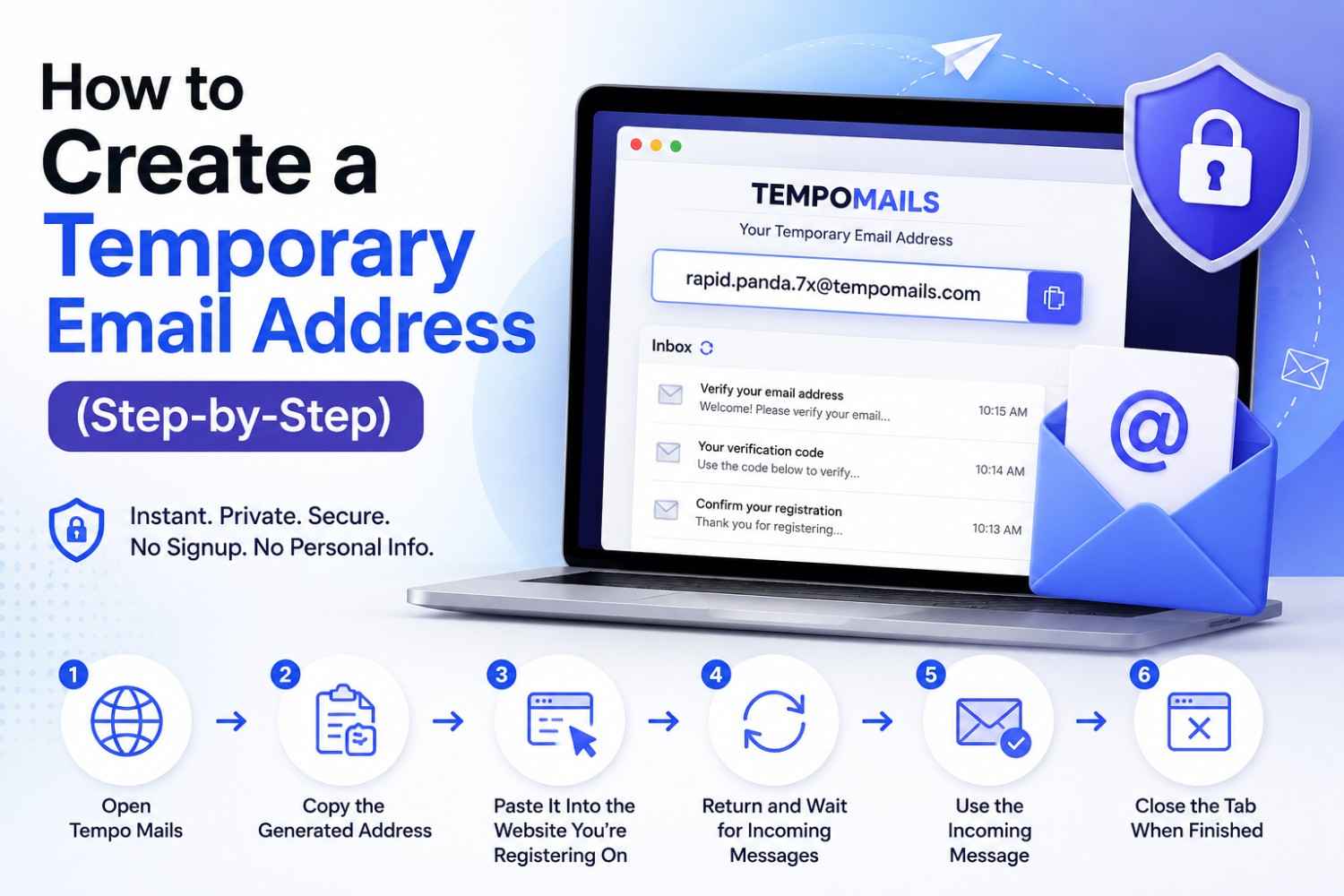
Open Tempomail. An address appears on screen. Copy it into any form requesting an email. Messages from that website arrive in the Tempomail inbox within seconds. Verification links are clickable. Confirmation codes are readable. Everything works the same as a standard inbox.
Close the tab or let the session expire. The service deletes every message and deactivates the address. No archive exists. No recovery is possible. The session is completely gone. The only difference from a real inbox is that this one was never connected to you.
Why a Throwaway Email Protects Your Real Inbox
Handing your real email to a website starts a process most users never fully trace. The address enters a marketing platform. That platform has data-sharing agreements. Those agreements move the address to partner lists.
Partner lists get sold, scraped, or compromised. The inbox fills with emails from sources that have no direct connection to the original signup.
A throwaway email breaks this chain at the first step. The website receives a valid address. The confirmation arrives. The disposable email is gone before any secondary sharing can begin.
The protection is complete rather than partial. Unsubscribing from marketing emails addresses the symptom. Using a disposable email prevents the problem from starting.
Common Situations Where a Disposable Inbox Helps
A disposable inbox is a session-based receiving account designed for single-use verification tasks, protecting the user's permanent email from long-term exposure to any platform or service.
- Free trial access. Platforms offering trial periods collect email addresses to begin billing sequences. A disposable mail inbox verifies without initiating that sequence against your real account.
- Gated content downloads. Reports, guides, and resources behind email submission forms deliver their content to any working address. A disposable address works just as well as a real one.
- Forum and community registration. Discussion platforms link email to posting history and send ongoing notifications. A disposable mail inbox handles registration without ongoing commitment.
- One-time purchases or enquiries. Buying from a new merchant or enquiring on a marketplace platform often triggers a long-term marketing contact. A disposable mail inbox absorbs this without affecting your primary email.
The same approach works across specific platforms too. If you’re verifying a Discord account, signing up for Twitter/X, or setting up a Facebook profile, a temporary inbox handles the confirmation email without exposing your real address. It also comes in handy when you want to try a fake email generator for quick testing, or just need a straightforward burner email address for everyday use.
What Happens to Disposable Email Data
Standard email providers retain message content, login times, and device information sometimes indefinitely, to support advertising systems. Reading habits, subject line engagement, and link-click behavior all feed into profile-building that users rarely consent to consciously.
Tempomail operates on a different model. The service retains no message content after deletion, stores no session data, and logs no usage patterns against a user profile. The inbox exists for the session, and nothing about it persists.
Privacy researchers have repeatedly found that users who switch to disposable email addresses for routine sign-ups see a measurable drop in spam volume within weeks, with no additional action required beyond changing their signup behavior.
This is what the disposable email meaning delivers at a practical level: fewer decisions, less inbox management, and no data trail to clean up later.
Disposable Email Address vs. Creating a Second Account
Creating a secondary permanent account with Gmail or Outlook provides some spam separation but incurs ongoing costs. The setup takes several minutes and requires a phone number on most platforms.
The account needs periodic monitoring. Storage fills up. The address still builds a history and accumulates its own marketing contacts over time. A disposable email address from Tempomail takes under ten seconds and requires nothing.
Each session starts with a fresh address. The inbox has no history. Nothing about the address connects to any other account or previous session. When done, there is nothing to maintain, delete, or check again.
About Tempomail
Tempomail provides instant disposable email addresses with no registration required. Open the tool, get a working throwaway email in seconds, receive messages in real time, and protect your privacy with automatic deletion. Visit tempomail.com to get started.
(FAQs)
Can I use a disposable email address for any website?
Most websites accept disposable addresses. Some platforms block known disposable domains. Tempomail rotates its available domains regularly to maintain compatibility with most services.
Does the disposable inbox receive HTML emails with images?
Yes. Tempomail renders full HTML emails, including images, formatted content, and clickable links directly within the inbox interface during the active session.
How is a disposable email address different from a spam folder?
A spam folder still receives and stores messages from your real address. A disposable inbox prevents those messages from ever being associated with your real address in the first place.
Can two people access the same throwaway email address simultaneously?
Anyone with the exact address string can view the inbox during the active session. Avoid using disposable addresses for anything requiring exclusive access or confidentiality.
Is there a limit to how many disposable inboxes Tempomail can create?
No usage limit applies. Generate as many addresses as needed. Each one is free, instant, and completely independent with its own separate inbox.
What types of emails cannot be received in a disposable inbox?
Tempomail receives standard emails. Encrypted messages requiring key exchange and messages blocked by the sending server before delivery are outside the scope of any disposable email service.
Does using a throwaway email affect the service I am signing up for?
No. The service receives a valid, working address and sends its verification to that address successfully. The experience on their end is identical to receiving any other email submission.
How do I know when a message has arrived in the disposable inbox?
Tempomail's inbox refreshes automatically. New messages appear without any page reload required, typically within five to fifteen seconds of being sent by the originating website.

