
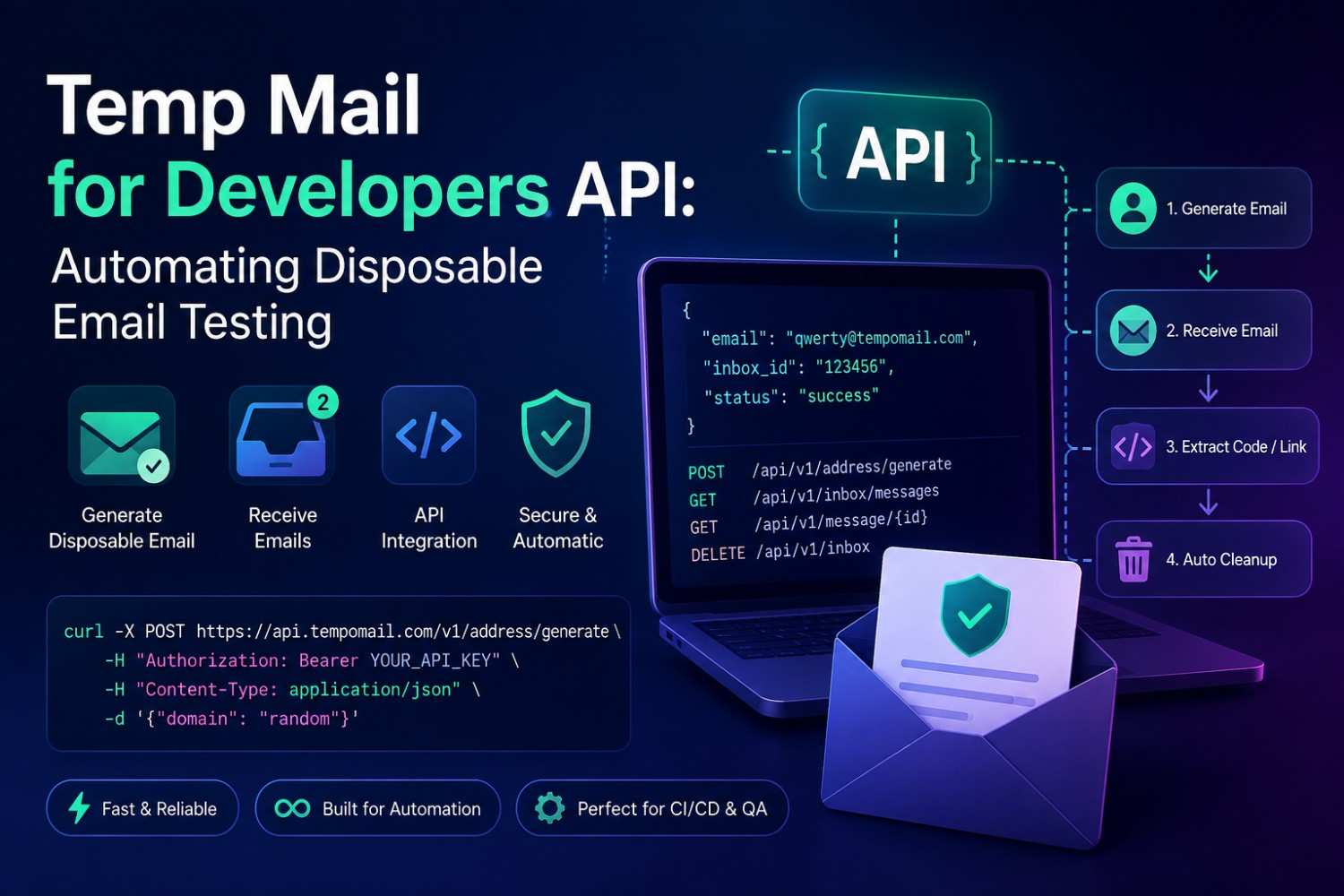
Temp Mail for Developers API: Automating Disposable Email Testing
Quick Answer: A temp mail for developers API offers programmatic access to disposable email generation and inbox retrieval, allowing email test automation without manual browser interaction. A disposable email API will be added by the developers to CI/CD pipelines, test suites, QA workflows, and generate unique addresses, receive transactional emails, retrieve verification codes, and clean up test data automatically at the end of each test run.
Manual email testing creates three problems. It runs slowly and adds fake user records to production databases. It also struggles to scale across parallel test environments without significant coordination.
A temp mail for developers API solves all three. Address generation, inbox polling, message retrieval, and session cleanup all become programmable actions integrated directly into existing test infrastructure without any manual browser interaction.
Tempo Mails’ temp mail for developers API gives development teams programmatic access to disposable inbox functionality, enabling email test automation at the speed and scale that modern software delivery requires.
Manual email verification is a common source of QA friction: testers routinely lose time each day clicking through inboxes to grab a single verification link or confirmation code, time that compounds quickly once it's multiplied across a full registration test suite.
Main Points
- A temp mail for developers API replaces manual browser-based verification steps with programmatic address generation and inbox polling.
- A temporary email API integrates directly into CI/CD pipelines, test suites, and QA automation frameworks without requiring external accounts or credentials.
- Automated email testing through an API eliminates fake user record accumulation in production databases by using addresses that expire and are automatically deleted after each test.
- Developer integration tools built around disposable email reduce test suite setup time and improve reliability across parallel testing environments.
What a Disposable Email API Does
A disposable email API gives development teams programmatic access to what is generally known as a disposable email address: address generation, inbox monitoring, and message retrieval through REST or similar protocols. This approach replaces browser-based testing with automated workflows. For a primer on the underlying concept, see what a temp mail address is and how it's used, and for a closer look at the mechanics, see how the inbox and delivery process works behind the scenes.
The core API operations follow a consistent pattern regardless of the platform implementing it.
Generate a new address by calling the address creation endpoint. The API returns a unique email address string. This address is immediately active and ready to receive messages.
Submit the address to the system under test, the registration form, the user creation endpoint, or whichever flow triggers the transactional email being tested. The system sends its email to the generated address.
Poll the inbox endpoint to check for new messages. The API returns message data, including sender, subject, body content, and any attachment information. The test script extracts the verification code, confirmation link, or other expected content.
Execute the next step in the test flow using the retrieved content. Click the confirmation link programmatically, submit the extracted code to the verification endpoint, or assert that the expected email content matches the specification.
Delete the session or allow it to expire. The address and all associated messages are removed with no residual test data left in any system.
Why Automated Email Testing Through an API Matters
Automated email testing uses code to generate, receive, and verify email content within a test suite. Scripted verification replaces manual inbox checks. These steps run at the same speed as the rest of the test.
The primary benefit is speed. A manual tester checking a verification inbox adds human wait time to every test that involves email. An automated test polling a temporary email API typically completes the inbox check within two to five seconds, matching the speed of the rest of the automated test suite.
The secondary benefit is cleanliness. Every test run using a temporary email API generates a fresh address. The address never existed before this test run. No prior message history exists in the inbox. No cleanup step is required because the address is deleted automatically when the session ends.
The third benefit is scalability. Parallel test environments require separate email addresses running simultaneously. A temporary email API generates as many unique addresses as the test suite needs, with no coordination between parallel instances and no risk of cross-contamination between test runs.
Developer Integration Tools: How to Integrate Tempo Mails' Disposable Email API
Developer integration tools for temporary email APIs are the libraries, SDKs, client wrappers, and documentation resources that simplify API integration into existing test frameworks, reducing implementation time and abstracting repetitive HTTP request logic.
Step 1 — Read the API Documentation
Go to the temp mail for developers API documentation and click on the API reference section. Before writing a line of integration code, check the base URL, available endpoints, authentication, and supported request formats and response schemas.
The core endpoints to identify at this stage are address generation, inbox listing, message retrieval by ID, and session deletion. Most temporary email APIs expose three to five endpoints covering these functions. If you're still evaluating providers, it helps to see how different temporary email tools compare before committing to one API.
Step 2 — Generate a Disposable Address in Your Test
Call the address generation endpoint at the start of each test case. The API returns a unique email address string that is immediately active and ready to receive messages.
Store the generated address in the test context. Use it wherever the test flow requires an email address, registration forms, user creation endpoints, or any flow that triggers a transactional email.
Step 3 — Submit the Address to the System Under Test
Pass the generated address to the application being tested. This could be a UI interaction through a browser automation tool, a direct API call to the user creation endpoint, or a form submission in an integration test environment.
The application sends its transactional email verification link, welcome message, password reset, or confirmation to the generated Tempo Mails address.
Step 4 — Poll the Inbox Endpoint
Use a polling loop to poll the inbox endpoint every period of time until a desired message is received or the timeout occurs.
Polling intervals of 2-3 seconds and a max timeout of 60 seconds will cover most sending server speeds, including slower systems that batch outgoing messages.
Step 5 — Extract the Required Content
When the message is received, the task is to interpret the response and extract the desired content—this could be a verification code, a confirmation link, the value of a subject line, attached metadata—whatever the test specifies.
With the content extracted, proceed with the next test in the test flow by clicking on the link, or input the content to a verification endpoint, or make an assert to the content is equal to the specification.
Step 6 — Clean Up at Test Teardown
Call the deletion endpoint or allow the session to expire at the end of each test. The address and all associated messages are removed automatically. No residual test data remains in any system. The next test run starts with a completely clean slate.
Step 7 — Handle Edge Cases
Add retry logic for network timeouts, implement fallback behaviour for emails that arrive outside the expected window, and document known slow-sending scenarios in your test suite for future reference. Some signup forms actively reject disposable addresses, so it's worth checking why some signup forms block temporary email domains before you rely on this approach in every environment, and for teams in regulated markets it's also worth reviewing whether using disposable email addresses is legally compliant as part of a compliance check.
Review Tempo Mails' rate limit documentation before deploying high-volume parallel test suites to ensure execution frequency aligns with API usage policies.
Testing Scenarios Where Temp Mail for Developers API Adds Value
Registration flow testing is the most common use case. Every test run generates a unique address, submits it through the registration form, polls for the verification email, extracts the confirmation link, and completes the signup all within the automated test sequence.
Password reset testing follows the same pattern. The test triggers a reset request, polls for the reset email, extracts the reset link, submits a new password, and asserts that login succeeds with the updated credentials.
Transactional email content testing verifies that the correct subject line, body content, and formatting appear in emails triggered by specific user actions. The temporary email API provides the inbox for receiving and the message content for asserting. This is different from aliasing or masking, which route messages back to a real inbox instead of an isolated one — it helps to know how temp mail compares to email aliases and masked email when choosing an approach for a given test scenario.
Multi-tenant environment testing requires separate email addresses per tenant per test run. A temporary email API generates these addresses on demand without any manual coordination between test environments. For flows that support both email and SMS verification, it also helps to know how disposable email compares to a virtual phone number for verification, since the two follow very different automation patterns.
Teams that replace manual inbox checks with a disposable email API consistently report faster QA cycles, since the entire email verification step moves from manual, wait-heavy checking to a scripted call that completes in seconds.
Final Verdict
A temp mail for developers API automates email testing by allowing it to be performed at the speed of the rest of the test suite.
This eliminates the accumulation of fake users in the email system, the manual pull of emails from the inbox from QA processes, and provides a clean scale-out of the system across parallel test environments.
For development teams where registration flows, password resets, and transactional email delivery are part of the product, email test automation through Tempo Mails' API is the practical next step in pipeline efficiency.
Author Note
Written by the Tempo Mails Engineering Team — Sarah Okoye, Senior QA Automation Engineer with 8+ years of experience building API-driven test infrastructure, builds and maintains the disposable email API and supporting developer integration tools. Documentation, endpoint references, and integration guides are available on the disposable email API homepage.
FAQs
Does Tempo Mails offer a public API for developers?
Yes. Tempo Mails provides API access for developers requiring programmatic disposable email generation and inbox retrieval. Documentation covering available endpoints, authentication, and response schemas is available at tempomails.com.
What programming languages can integrate with a temporary email API?
Any language capable of making HTTP requests integrates with a REST-based temporary email API. Python, JavaScript, Java, Ruby, Go, and PHP all support standard HTTP client libraries suitable for API integration.
How does the API handle slow email sending servers during automated testing?
A polling mechanism needs to be put in place for email automation. The typical polling time interval used in most email test automation implementations is every 2-3 seconds with a timeout of 60 seconds.
Can multiple test environments use the Tempo Mails API simultaneously?
Yes. Each API call generates an independent address with its own isolated inbox. Parallel test environments generate separate addresses concurrently without any risk of message cross-contamination between test runs.
Does using a disposable email API leave test data in production databases?
Not from the email side. The generated address expires and is deleted automatically. Test accounts created in the application under test may require separate cleanup. The API handles email cleanup, not application database cleanup.
Is rate limiting applied to the disposable email API?
API usage policies, including rate limits, are documented in the Tempo Mails API reference. Teams with high-volume automated email testing requirements should review rate limit specifications before integration to ensure compatibility with test suite execution frequency.
Can the API retrieve attachment content from received emails?
Yes. The message retrieval endpoint returns full message content, including attachment metadata and binary data. Test suites can extract and assert on attachment content programmatically as part of the email test automation workflow. For more on what's supported at the inbox level generally, see whether a temporary email address can receive attachments.
How does a temporary email API compare to using a shared test mailbox?
A shared test mailbox accumulates messages from all test runs, requires periodic cleanup, and creates cross-test interference. A temporary email API generates a fresh, isolated inbox per test run with automatic cleanup, eliminating all three problems simultaneously.
Related Source:

