
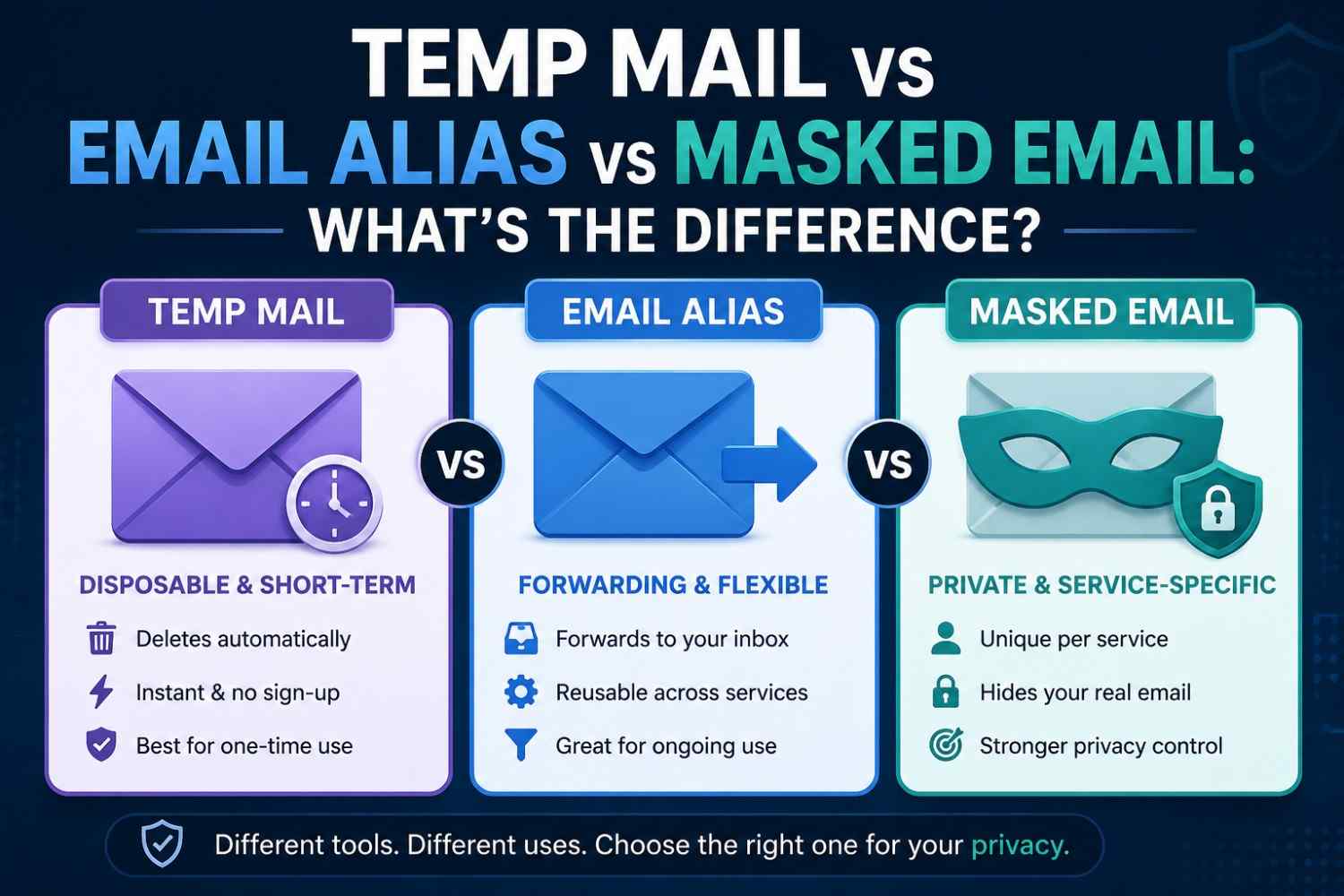
Temp Mail vs Email Alias vs Masked Email: What's the Difference
Quick Answer: Temp mail vs email alias, and masked email are three distinct privacy tools that protect your real inbox in different ways. Temp mail deletes automatically after use. An email alias forwards messages to your real inbox while hiding it. A masked email generates a permanent decoy address. Both have different applications, and it depends on the length of time that the address must be kept active. Last Reviewed: August 2026
Three tools. Three different approaches to the same privacy problem. Every signup form that asks for an email address gives three real choices: hand over a real inbox, use a privacy tool, or skip the signup entirely. A temporary email generator creates a disposable inbox that deletes itself. An email alias routes messages through a secondary address to your real inbox.
A masked email creates a permanent forwarding address. Understanding these differences will help you select the appropriate tool for the job. Tempomail provides instant temp mail with no registration required. The fastest option when a working address is needed for seconds, not months.
Privacy researchers consistently find that matching the right tool to the task, rather than defaulting to one option for everything, produces the sharpest drop in inbox spam. Users who matched each privacy tool to the task achieved the best results.
Main Points
- Temp mail vs email alias is not a question of which is better; each solves a different privacy problem for a different use case.
A masked email address provides long-term inbox protection. It routes messages through a decoy address linked to your real account.
- An email forwarding service delivers messages from an alias or masked address to a real inbox, creating a layer of separation without losing ongoing access.
- Tempomail is the strongest disposable email alternative for one-time verifications where no ongoing message delivery is needed.
What Temp Mail Is and When to Use It
Temp mail creates a disposable address instantly. It receives messages in real time and deletes all content when the session ends. It requires no registration and collects no personal data. This approach follows the broader disposable email address concept used across privacy tools to keep a real inbox protected.
Temp mail vs email alias comparisons often miss the most important distinction: temp mail is designed to disappear. It has no continuity. It serves one interaction and then ceases to exist.
This makes it the correct tool for any situation where you need a working inbox once and have no intention of returning to it. For a complete walkthrough of how disposable inboxes work from start to finish, see the full guide.
Free trial signups, one-time content downloads, forum registrations, and developer testing all fit this profile. The address works. The verification arrives. The session ends. Nothing persists.
Tempomail generates a disposable email address the moment the site loads. You do not need to enter any information. You do not need to manage an account. The inbox stays clutter-free afterwards.
What an Email Alias Is and When to Use It
An email alias is an alternative email address that sends messages to a valid email address via an email forwarding service. Users can use the alias rather than their actual address and still receive all of the messages sent.
An alias does not delete itself. It stays active until you disable it. Every message goes to the connected inbox. Your real address stays hidden while communication continues.
This makes aliases appropriate for situations where ongoing communication is expected. Registering for a newsletter you actually want. Setting up vendor accounts where invoices need to arrive reliably. Providing contact details to a business relationship where the connection has long-term value.
The alias functions as a filter. If one alias starts receiving spam, it can be deactivated without affecting the real inbox or any other alias. Multiple aliases for different purposes keep incoming mail organised and traceable to its source.
The limitation is that an alias still exists in a permanent system. Someone with access to the alias can reach the underlying inbox if they discover the forwarding connection. It provides separation, not anonymity.
What a Masked Email Address Is and When to Use It
A masked email address is a unique forwarding address for one service or relationship. It routes messages to your real inbox while keeping your real address hidden.
Services such as Apple's Hide My Email and Firefox Relay generate masked addresses on demand. Each address is unique to the service that created it. Messages from that service route through the masked address to the real inbox. The service never sees the real email.
The difference between a masked email and a standard alias is specificity. You can reuse aliases across multiple services. Masked addresses are typically single-service, one address per signup, making it easy to identify which service leaked or sold your contact details.
A masked email address is the strongest long-term privacy tool among the three options, since each address is tied to a single service. It maintains communication continuity while providing complete concealment of the real inbox.
The tradeoff is that managing complexity, which requires a tool designed for the purpose, and the underlying real inbox still accumulates all forwarded messages.
Temp Mail vs Email Alias: Direct Comparison
Temp mail vs email alias is a comparison of two privacy tools differentiated primarily by duration. Temp mail provides temporary access with automatic deletion, while an email alias provides permanent access with ongoing forwarding. The right choice depends entirely on what happens after the initial interaction.
If nothing needs to happen, the website sends one verification email, and the relationship ends. Temp mail is the correct tool. Faster to generate, leaves no data, requires no ongoing management.
If messages need to continue arriving- order confirmations, newsletter content, account security alerts- an alias or email alias is the correct tool. The real inbox receives everything without exposing the real address.
Using temp mail for situations that require ongoing access creates account recovery problems when the address expires. Using an alias for one-time verifications creates unnecessary inbox clutter that requires periodic management. For a closer look at the temp mail versus a real email account comparison, see the full breakdown.
Industry surveys on email behaviour consistently show that users who rely on temp mail for one-time signups report far less inbox clutter than users who rely on a permanent alias for the same low-stakes registrations.
Head-to-Head Comparison
Feature | Disposable Email (Temp Mail) | Email Alias | Masked Email |
Privacy Isolation | ✅ Complete | ❌ Partial | ✅ Strong |
Setup Speed | Instant | 2–5 minutes | 2–5 minutes |
Duration | Temporary | Permanent | Permanent |
Spam Protection | Excellent | Moderate | Strong |
Email Organization | ❌ No | ✅ Yes | ✅ Yes |
Long-term Use | ❌ Not suitable | ✅ Yes | ✅ Yes |
Leak Impact | Minimal | High | Low |
Cost | Free | Free (limited) | Free (limited) |
Registration Required | ❌ None | ✅ Yes | ✅ Yes |
Anonymous | ✅ Fully | ❌ Partially | ❌ Partially |
Which Tool Works Best for Which Situation
Temp mail works best for: free trials, single-use downloads, one-time forum registrations, developer testing, and any interaction where no ongoing contact is expected or wanted.
An email forwarding service works best for: subscriptions with ongoing value, vendor relationships, and any signup where receiving future messages matters, but the real address should remain hidden.
An email alias works best for long-term service relationships where the user wants to identify data leaks, maintain communication continuity, and keep the real inbox completely concealed from every service individually.
Tempomail is the fastest free temporary email generator for the first category: open the site, copy the address, complete the signup, and close the tab. No tool is faster for one-time temporary email needs. To see how it stacks up against other tools, check this comparison of the best temporary email generators in 2026.
The Hybrid Strategy: Using Both Together
The most effective email privacy approach does not choose one tool and apply it everywhere. It uses each tool where it performs best.
Use the disposable email tool as the default for any signup where no ongoing communication is expected. Free trials, content downloads, forum registrations, developer testing, and one-time platform access all belong in this category. The address is generated in seconds, the task completes, and nothing persists. Not sure how much time you have before the address needs to disappear? Here's how long a disposable inbox stays active before it expires.
Use an email alias or masked email address for any service where ongoing communication has genuine value, newsletters you actually read, vendor accounts that send invoices, subscriptions where you want to track which service shared your contact details.
The hybrid approach delivers the best of both tools. Disposable email handles the high-volume, low-value signups that generate most inbox clutter. Email aliases handle a smaller number of relationships where communication continuity matters but real address exposure does not.
The result is a primary inbox that receives only the messages it was meant to receive, from the services you chose to connect with directly, and nothing else.
Conclusion
The difference between using Temp Mail and Email Alias is the amount of time you require to use the email address. For one-time sign-ins, a Disposable Email Alternative is the best option. Tempomail provides a fast, privacy-focused temporary inbox while protecting your real email address.
About the Author
Written by Sarah Whitfield, Digital Privacy & Email Security Analyst — 6+ years covering inbox privacy, disposable email tools, and anonymous communication services. Content is based on direct tool testing and privacy research, and is reviewed regularly to reflect current service behaviour.
FAQs
Can I use temp mail and an email alias for the same account?
No. They serve different purposes. Temp mail deletes after use, making it unsuitable for accounts requiring ongoing access. An alias maintains that access. Choose based on whether future messages need to arrive.
Is a masked email address free to use?
Some services offer free masked addresses with limitations. Apple's Hide My Email is free for iCloud subscribers. Firefox Relay offers a free tier with a limited number of addresses before users need a paid plan.
Does an email forwarding service expose my real inbox?
Not directly. The forwarding connection is internal to the service managing the alias. The receiving website sees only the alias address, never the real inbox it forwards to.
Can websites detect a masked email address during signup?
Masked addresses look identical to standard email addresses and are not detectable through normal validation. Some platforms block specific domains associated with masking services when those domains become known.
What happens to temp mail messages if I close the browser accidentally?
The session ends, and all messages are permanently deleted. Tempomail does not preserve sessions across browser closures. Open a fresh session and request a new verification from the website if needed. For step-by-step help, see this guide on accessing your temporary mailbox instantly and securely.
Is Temp Mail a good disposable email alternative to masked email for developers?
Yes. Developers testing registration flows benefit from temp mail's instant generation and automatic cleanup. Masked email is better suited to production accounts requiring permanent access. For test environments, temp mail is the faster and cleaner option.
Can an email alias be traced back to my real address?
If the alias service is compromised or legally compelled to disclose forwarding records, yes. Aliases provide separation, not full anonymity. Temp mail provides stronger anonymity because no forwarding connection exists, and no data is retained.
Which option provides the strongest privacy protection overall?
Use Tempomail for one-time interactions. If you need to use email with others in the future, use a reliable service that offers a masked address. Use each tool for a different task, rather than the same one in every instance.

